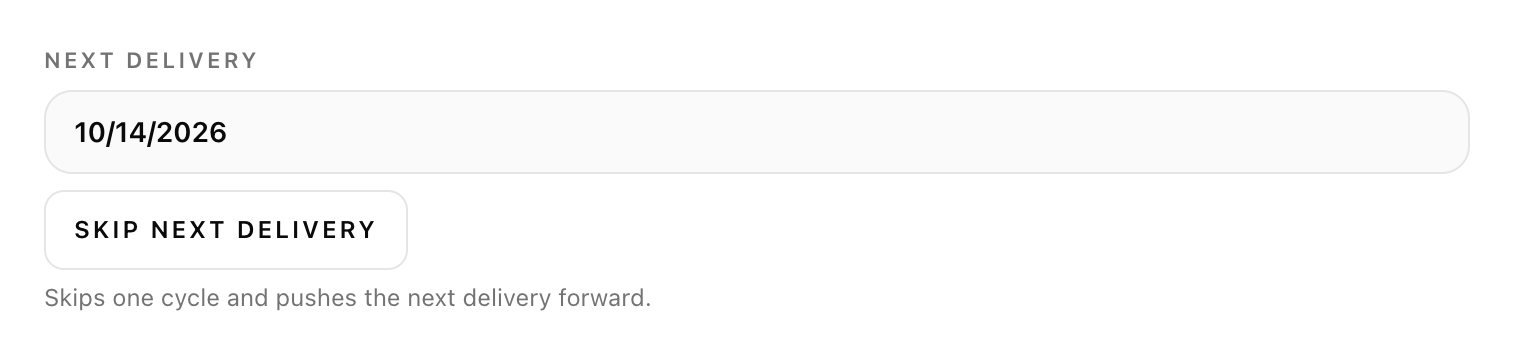
Find Next delivery at the top of the subscription details.
Select Skip next delivery.
Check that the date moved forward by one cycle. That’s your new delivery date.
Skipping moves your charge along with the date — you won’t be billed for the delivery you skipped. Need a longer break? Pause instead.
Pause
Take a break
At the bottom of your subscriptionAfter pausing
Select Pause subscription at the bottom of the subscription details.
Wait for the update and check that the status says Paused.
Ready again? Return here and select Resume subscription.
A pause holds your subscription for as long as you like, with no charges. Skipping, frequency and quantity changes need an active subscription, so resume first.
Modify
Find your rhythm
Delivery frequency & quantityThe Items card
Choose a Delivery frequency or use − / + to adjust your quantity. These changes save automatically.
To swap an item, select Change product, choose the replacement, then Confirm change.
Wait for the success message. Review your next delivery date and recurring total.
Changing frequency restarts your billing cycle. Your next charge is one new interval from today.
Cancel
Stop renewals
The cancellation confirmation
Select Cancel next to the subscription — it’s on your account dashboard and on the Subscriptions list. Already opened it with Manage? Use Cancel subscription at the bottom.
In the confirmation window, select Yes, cancel.
Wait for the cancellation confirmation. If it’s still pending, use Retry cancel or contact support.
Cancel before your renewal to stop future charges. Orders already in progress will still ship.
Actual account UI shown with sample details. Your products, dates, prices, and available options may vary.
Overview
By subscribing to our services/products, you agree to recurring billing per the plan selected. This ensures continued access to our products and services without interruption.
Subscription Plans
Subscriptions are billed monthly.
Prices and terms may change with prior notice.
Billing & Payment
Automatic charge to your selected payment method at the start of each cycle.
If a payment fails, we will retry. Continued failure may pause or cancel the subscription.
Auto‑Renewal
Subscriptions auto‑renew unless canceled before the renewal date.
Manage or cancel anytime from Subscriptions in your account.
Billing Reminder
Ensure your payment method stays current to avoid pauses or cancellations.
Refunds & Prorated Charges
No refunds for partially used subscription periods.
If you cancel before renewal, you won’t be charged again. Any order already in progress will still ship.
Cancellation stops future renewals immediately. Any order already in progress will still ship. No further charges apply once cancellation is successful.
Refund Policy
We do not provide refunds for unused portions of the subscription period. For accidental charges, contact support within 7 days for assistance.